Here is how to create matplotlib graphs in Python.
import matplotlib.pyplot as plt

# Sample data
x = [1, 2, 3, 4, 5]
y = [2, 3, 5, 7, 11]
# Create a line plot
plt.plot(x, y, marker='o', linestyle='-')

# Add labels and title
plt.xlabel('X-axis Label')
plt.ylabel('Y-axis Label')
plt.title('Example Plot')
# Show grid
plt.grid(True)

# Show the plot
plt.show()
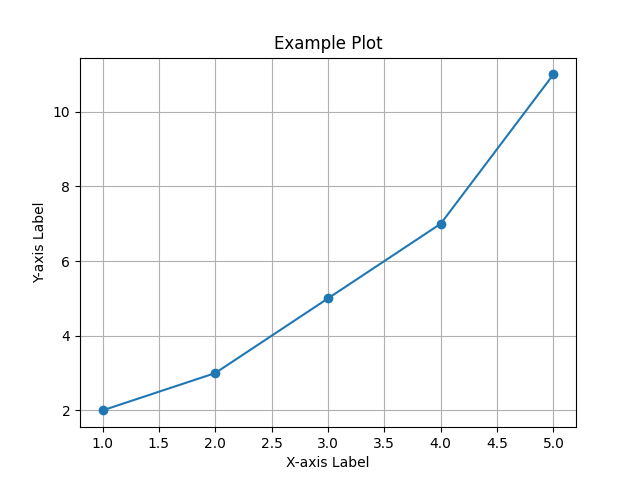
Output
Explanation
- We import the
matplotlib.pyplotmodule, which provides a MATLAB-like plotting framework. - We define some sample data for the x and y axes.
- We create a line plot using
plt.plot(x, y). Themarker='o'argument adds circular markers at each data point, andlinestyle='-'specifies a solid line connecting the markers. - We add labels to the x and y axes using
plt.xlabel()andplt.ylabel()respectively. - We set a title for the plot using
plt.title(). - We enable the grid on the plot using
plt.grid(True). - Finally, we display the plot using
plt.show().
You can run this code in a Python environment that has Matplotlib installed, and it will display a simple line plot with labeled axes and a title. Feel free to customize the data, plot style, labels, and other properties to suit your needs.
Practice what you just learned
Solve Python exercises and get instant AI feedback on your solutions.
Try ActiveSkill for Free →Related HowTos
Use the polars library
Use Selenium to browse a page
Load JSON data
Build a GUI with FreeSimpleGUI
Delete a directory
Delete a file
Rename a file
Get today's date and convert to string
Create a text file and write text on it
Read a text file with Python
Scrape a Wikipedia page
Install dependencies
Flush the output of the print function
Prettyprint a JSON file
Create a dictionary with list comprehension
Select multiple columns in a Pandas dataframe
Profile a script
Reverse a string
Convert two lists into a dictionary
Convert an integer into a string
Generate random strings with upper case letters and digits
Extract extension from filename
Print to stderr in Python
Generate random integers between 0 and 9
Use a pythonic way to create a long multi-line string
Measure elapsed time in Python
Install specific package versions with pip
Read from stdin (standard input)
Get the class name of an instance
Check if a string is empty
Pad zeroes to a string
Delete an element from a dictionary
Check if a string is a float
Count the occurrences of an item in a list
Remove an element from a list by index
Use static methods
Remove a trailing newline
Print literal curly-brace characters in a string and also use .format on it
Exit/deactivate a virtualenv
Determine the type of an object
Limit floats to two decimal points
Know if an object has an attribute
Select an item from a list randomly
Read a file line-by-line into a list
Call a function of a module by using its name
Get the number of elements in a list
Print without a newline or space
Sort a list of dictionaries by a value of the dictionary
Remove a key from dictionary
Rename column names with Pandas
Lowercase a string
Upgrade all Python packages with pip
Get a substring of a string
Get the last element of a list
Parse a string to a float or integer
Convert a string into datetime format
Access environment variable values
Print coloured text on the terminal
Find current directory of a file
Change the size of figures drawn with Matplotlib
Manually raise an exception
Delete a file or folder
Split a list into evenly sized parts
Select rows from a DataFrame based on column values with Pandas
Install pip on Windows
Check if a given key already exists in a dictionary
Iterate over rows in a DataFrame for Pandas
Make function decorators and chain them together
Pass a variable by reference
Make a time delay
Convert bytes to a string
Copy a file
Concatenate two lists
Add new keys to a dictionary
Catch multiple exceptions in a single 'except' block
Check if a list is empty
Get the current time
Sort a dictionary by value
Use global variables in a function
List all files of a directory
Iterate over dictionaries using for loops
Check if a string contains a substring
Find the index of an item in a list
Understand how slice notation works
Make a flat list out of a list of lists
Accesses the index in for loops
Safely create a nested directory
Merge two dictionaries in a single expression
Check whether a file exists without exceptions
Convert a dictionary into a list
Convert a list into a dictionary
Duplicate a file
Append text in a text file
Use for loops
Deploy a web app to Heroku
Schedule a Python script for execution at a specific time every day
Store Python passwords securely on Windows, Mac, and Linux
Do dictionary comprehension
Do list comprehension
Create a virtual environment
Create a new file
Merge two lists
Extract items from two different lists into one list
Check if a text file is empty
Randomly select an item from a list
Generate a random integer
Break a while loop
Create a pandas DataFrame from a dictionary
Create a pandas DataFrame from a list
Get the last item of a list
Delete a column from a pandas dataframe
Access a column of a pandas dataframe
Create a class
Make a webpage request
Get the first two characters of a string
Loop through two lists at the same time
Use Selenium to browse a page
Load JSON data
Build a GUI with FreeSimpleGUI
Delete a directory
Delete a file
Rename a file
Get today's date and convert to string
Create a text file and write text on it
Read a text file with Python
Scrape a Wikipedia page
Install dependencies
Flush the output of the print function
Prettyprint a JSON file
Create a dictionary with list comprehension
Select multiple columns in a Pandas dataframe
Profile a script
Reverse a string
Convert two lists into a dictionary
Convert an integer into a string
Generate random strings with upper case letters and digits
Extract extension from filename
Print to stderr in Python
Generate random integers between 0 and 9
Use a pythonic way to create a long multi-line string
Measure elapsed time in Python
Install specific package versions with pip
Read from stdin (standard input)
Get the class name of an instance
Check if a string is empty
Pad zeroes to a string
Delete an element from a dictionary
Check if a string is a float
Count the occurrences of an item in a list
Remove an element from a list by index
Use static methods
Remove a trailing newline
Print literal curly-brace characters in a string and also use .format on it
Exit/deactivate a virtualenv
Determine the type of an object
Limit floats to two decimal points
Know if an object has an attribute
Select an item from a list randomly
Read a file line-by-line into a list
Call a function of a module by using its name
Get the number of elements in a list
Print without a newline or space
Sort a list of dictionaries by a value of the dictionary
Remove a key from dictionary
Rename column names with Pandas
Lowercase a string
Upgrade all Python packages with pip
Get a substring of a string
Get the last element of a list
Parse a string to a float or integer
Convert a string into datetime format
Access environment variable values
Print coloured text on the terminal
Find current directory of a file
Change the size of figures drawn with Matplotlib
Manually raise an exception
Delete a file or folder
Split a list into evenly sized parts
Select rows from a DataFrame based on column values with Pandas
Install pip on Windows
Check if a given key already exists in a dictionary
Iterate over rows in a DataFrame for Pandas
Make function decorators and chain them together
Pass a variable by reference
Make a time delay
Convert bytes to a string
Copy a file
Concatenate two lists
Add new keys to a dictionary
Catch multiple exceptions in a single 'except' block
Check if a list is empty
Get the current time
Sort a dictionary by value
Use global variables in a function
List all files of a directory
Iterate over dictionaries using for loops
Check if a string contains a substring
Find the index of an item in a list
Understand how slice notation works
Make a flat list out of a list of lists
Accesses the index in for loops
Safely create a nested directory
Merge two dictionaries in a single expression
Check whether a file exists without exceptions
Convert a dictionary into a list
Convert a list into a dictionary
Duplicate a file
Append text in a text file
Use for loops
Deploy a web app to Heroku
Schedule a Python script for execution at a specific time every day
Store Python passwords securely on Windows, Mac, and Linux
Do dictionary comprehension
Do list comprehension
Create a virtual environment
Create a new file
Merge two lists
Extract items from two different lists into one list
Check if a text file is empty
Randomly select an item from a list
Generate a random integer
Break a while loop
Create a pandas DataFrame from a dictionary
Create a pandas DataFrame from a list
Get the last item of a list
Delete a column from a pandas dataframe
Access a column of a pandas dataframe
Create a class
Make a webpage request
Get the first two characters of a string
Loop through two lists at the same time
Recommended Course
Python Mega Course: Learn Python in 60 Days, Build 20 Apps
Learn Python on Udemy completely in 60 days or less by building 20 real-world applications from web development to data science.